Projector
one loop for every reel on this site
This site felt laggy. A breathing glow, a 3D globe and a drawer of hidden trinkets each ran their own clock. Projector is a small scheduler that runs all of them on one frame loop, pauses what nobody can see and lowers quality when frames get slow.
This site is a cinema. A soft glow breathes behind every page, a 3D globe spins on the home page and dozens of small hidden trinkets wait for a key or a scroll. It also felt laggy, even while nothing was moving on purpose.
A first pass fixed the biggest costs one at a time. That left the right numbers but the wrong shape: every animation still ran its own clock, and each one decided on its own whether to stop when it was offscreen, when the tab was hidden or when the page was scrolling. Projector replaces those clocks with one engine. Every animation is a reel, and one projector decides which reels run on each frame.
Every claim on this page comes from a script, not from how the site felt. A Playwright harness opens Home, a case study and the resume in Chrome, waits for the page to settle, and records a DevTools trace for three seconds of idle and for a full scroll down and back up. From the trace it adds up how long each browser thread was busy: CrRendererMain is the main thread that runs JavaScript, style and layout, and CrGpuMain is the GPU process. Both are reported in milliseconds of work per second.
To find what cost what, the same harness injects one CSS rule before the page loads and runs again: no glow, no blur, no animations. The difference between two runs is the cost of that one layer. Lighthouse mobile and desktop ran on Home before and after each change, and the same harness runs with the CPU slowed 4 times to stand in for a cheaper laptop or phone.
| Variant | Idle GPU | Scroll main |
|---|---|---|
| As shipped | 79 | 307 |
| No glow blobs | 17 | 279 |
| No backdrop blur | 34 | 302 |
| Every CSS animation paused | 0 | 307 |
- The glow: 13 blurred gradients, 620 to 895px each, animated every frame forever with will-change on all of them. The nav blur and a backdrop blur on every card recomputed over them. Removing only the blobs took Home's idle GPU from 79 to 17 ms per second.
- Scroll effects in JavaScript: every section reveal ran a spring and three transforms in JavaScript on each scroll frame. Home spent 307 ms of main thread per second of scrolling.
- Startup: all 27 trinkets and a 912KB three.js chunk downloaded and ran before anyone could use them. Lighthouse mobile scored 73 with 290 ms of blocking time.
- Every animation for itself: after the first fixes, the glow, the globe, the split-flap titles, two countdowns and four checks on scroll, resize and layout each kept their own interval, frame loop or frame request, and each paused itself for its own reasons, or not at all.
Projector is plain TypeScript: pure functions and one module-level list of reels, in three small files behind one entry. A reel is an object with a name, a tick, an optional step size per gauge, a priority and an optional element. roll() starts it and returns the function that cuts it. A tick that returns false ends its own reel.
const cut = roll({
  name: "glow",
  every: [1000, 500, 250],
  priority: Priority.ambient,
  el: blob,
  margin: "200px",
  tick: () => breathe(blob),
});- One loop: a single requestAnimationFrame callback runs every reel that is due. When only slow reels are left, like the glow at four steps a second, it sleeps on a timer instead of waking every frame, and when no reel can run it stops.
- Sight: one IntersectionObserver per margin tells the loop which reels are on screen. The loop also knows when the tab is hidden, when the visitor prefers reduced motion and when the page is being scrolled. Scenery and ambient reels wait out a scroll and rest under reduced motion, and interface reels never do.
- A frame budget: each tick is timed. Once reels have used 6 ms of a frame, lower priority reels are held to the next frame instead of stretching this one.
- Gauges: the loop watches real frame times, and the Long Animation Frames API covers the frames it does not see. When a quarter of the last two seconds went to frames slower than 25 ms, quality drops one gauge, from 35mm to 16mm to Super 8. It only climbs back after 4 calm seconds, and that wait doubles, up to 32 seconds, each time it drops again right after climbing, so it cannot flap.
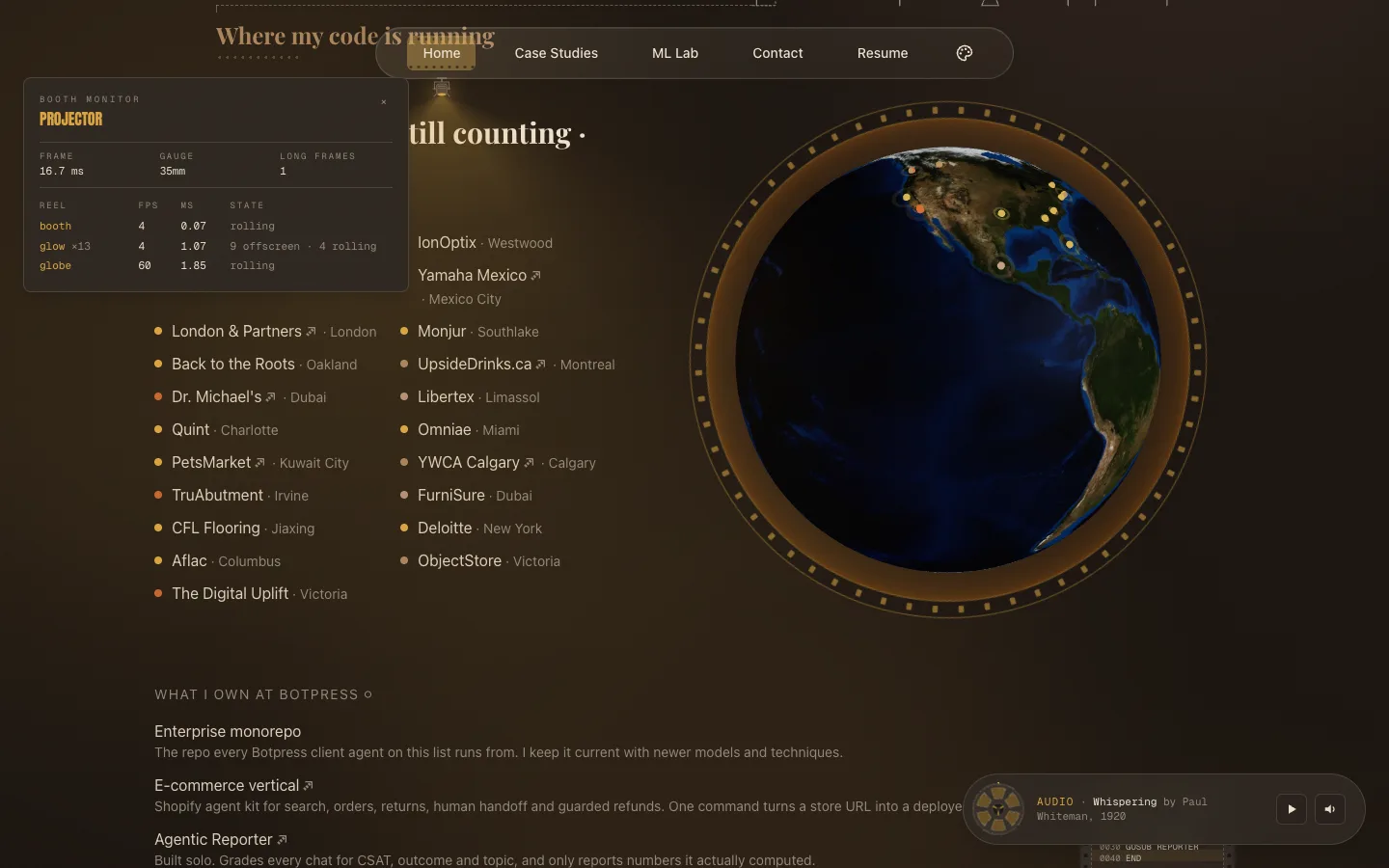
- The booth monitor: type fps on any page and a small panel shows the frame time, the gauge, long frames and every reel with its rate, cost and state. It is a separate chunk that only downloads when opened.
- Glow: the 13 blobs were one 250 ms interval plus their own IntersectionObserver. Now each blob is a reel stepping at 250, 500 or 1000 ms by gauge, and at Super 8 every second blob and the film grain rest.
- Globe: three.js ran its own loop at the display's refresh rate and was switched off while scrolling by a separate hook. Now the canvas never draws on its own: a reel advances it at 60 frames a second, or 30 with a lower pixel ratio at the smaller gauges. The spin is scaled by the real time between frames, so it turns at the same speed on a 60 Hz and a 120 Hz screen, and it no longer jumps back when it resumes.
- Split-flap titles, launch gantry, mission countdown: three setIntervals at 45, 24 and 300 ms became reels that end themselves.
- Scroll, resize and layout checks: the end-of-reel card, the rewind, the masking ratio and the layout watcher each asked for their own frame. Now they share one with cue(), which also drops a repeat request in the same frame.
Left as they were, on purpose:
- Scroll reveals and the career spine: they are CSS scroll-driven animations, so the browser runs them off the main thread already.
- Machine Learning Lab training loops: they run only on the lab pages, while a model trains or a chart settles, and the harness does not measure those pages. Moving them without numbers would be a guess.
- One-shot timers: a trinket that hides itself after 1.8 seconds is a timer, not an animation. Putting it on the loop adds nothing.
Every idea was measured before it shipped, and some did not survive.
- Inlining the CSS: Next's inlineCss flag put every stylesheet into the HTML. The home page HTML doubled to 186KB and mobile LCP got worse, 5.3 s, so it stayed off.
- content-visibility on long sections: it lets the browser skip offscreen sections. Here it made scrolling cost more, not less: Home went from 234 to 250 ms per second of main thread and the resume from 162 to 171, so it stayed off.
- The React Compiler: a trial build with reactCompiler on top of Projector added about 31KB of JavaScript to Home and 27 to 30KB to the case study and resume, and its idle and scroll numbers stayed inside the spread I saw between repeat runs of one build. The download was a sure cost and the gain was not measurable, so it was dropped before the PR.
- Sleeping between slow steps: waking every frame would mean 60 wake-ups a second to run the glow's 4 steps. Any reel slower than 40 ms runs straight from a timer, so on an idle page the glow costs one timer every 250 ms, as the old interval did, and the idle trace shows no frame requests at all. The first build woke a frame after each timer, and idle main thread went up until that was removed.
The first pass, with the glow on a 250 ms step, the reveals in CSS and the trinkets loaded when the browser is idle, did most of the work:
| Measure | Before | After |
|---|---|---|
| Home, GPU while idle | 79 | 29 |
| Home, main thread while scrolling | 307 | 234 |
| Case study, GPU while idle | 91 | 32 |
| Resume, GPU while idle | 126 | 31 |
| Resume, main thread while scrolling | 198 | 162 |
| Lighthouse mobile | 73 | 82 |
Projector was measured against that result with three runs of each build taken in turn, so both saw the same machine state. Medians:
| Measure | Before | After |
|---|---|---|
| Home, GPU while idle | 33 | 28 |
| Home, main thread while idle | 35 | 26 |
| Home, main thread while scrolling | 294 | 292 |
| Case study, main thread while scrolling | 112 | 108 |
| Resume, main thread while scrolling | 213 | 201 |
| Home, scrolling at 4x CPU | 418 | 393 |
| Resume, scrolling at 4x CPU | 323 | 335 |
| Resume, dropped frames at 4x CPU | 7 | 3 |
| Globe in view, main thread | 270 to 294 | 282 to 293 |
| Lighthouse mobile · desktop | 82 · 99 | 82 · 99 |
At normal speed, Projector costs about the same as the code it replaced. It is not a speedup on its own. Most numbers moved by less than the spread between repeat runs of one build, and the one that got worse, the resume scrolling at 4x CPU, rose 4% while its dropped frames went from 7 to 3. What it bought is one place to make those decisions. Building it also surfaced a cost the old code hid: the globe's canvas measured itself again on every scroll event, so the first engine build repainted the globe each time. Turning that scroll measuring off fixed both. On this laptop the gauge never dropped, even with the CPU slowed 8 times, because frames stayed at 60 a second.
- One machine: every number comes from one laptop running Chrome under Playwright. Real phones and other browsers will differ.
- The gauge reads the main thread: frame times and long frames show work in JavaScript, style and layout. A slow GPU that keeps the main thread free is not seen.
- Reduced motion freezes the globe: it used to keep spinning for visitors who ask for less motion. Now it shows one still frame.
- The lab loops are still separate: the Machine Learning Lab keeps its own frame loops until they are measured.
Type fps on any page, without a text box focused, to open the booth monitor. It also sits on the cheat sheet behind ?. Scroll the globe into view and watch its reel go from offscreen to rolling, then scroll and watch it yield.